Electric Dusters vs. Canned Air: A Key Upgrade for Cleaning Your PC


Photo: Chris Hoffman
The first time I used a can of air, it was like magic. With the press of a trigger, a jet of air cleaned out my PC's fan vents and lifted the gunk from my keyboard. But, if you find yourself buying can after can of air, it might be time for a strategic upgrade.
That upgrade is an electric duster. Buy it once and you buy it for life. You'll be able to blow all the air you want to clean out your gadgets. You can blast all the air you want, whenever you want.
Canned air isn't actually air
Canned air dusters contain a mix of chemicals; they aren't exactly "compressed air." Mechanically, they contain gases compressed into liquids, and the gasses come out of the nozzle at high speeds when you press the trigger.
You should also be very careful with canned air cleaners. When you turn a can of air upside down, you could end up spraying very cold liquid — cold enough to damage components. I've often wondered how many new PC users have flipped a can of air upside down to get into an enclosed space and gotten an unexpected blast of frosty chemicals rather than a jet of gas.
Electric dusters are the best canned air alternative
For the cost of a few cans of air, you can get a reusable electric duster that will do the job. It's a one-time investment that will quickly pay for itself.
Electric dusters are actually air — they have a small motor and direct a jet of air where you point them.
These are very different from vacuum cleaners. Vacuum cleaners generate static electricity, so using a vacuum cleaner to dust out a PC isn't a great idea — it could damage your components. Electric dusters blow air and are designed for this sort of work. Plus, they have attachments designed to work well in small spaces.
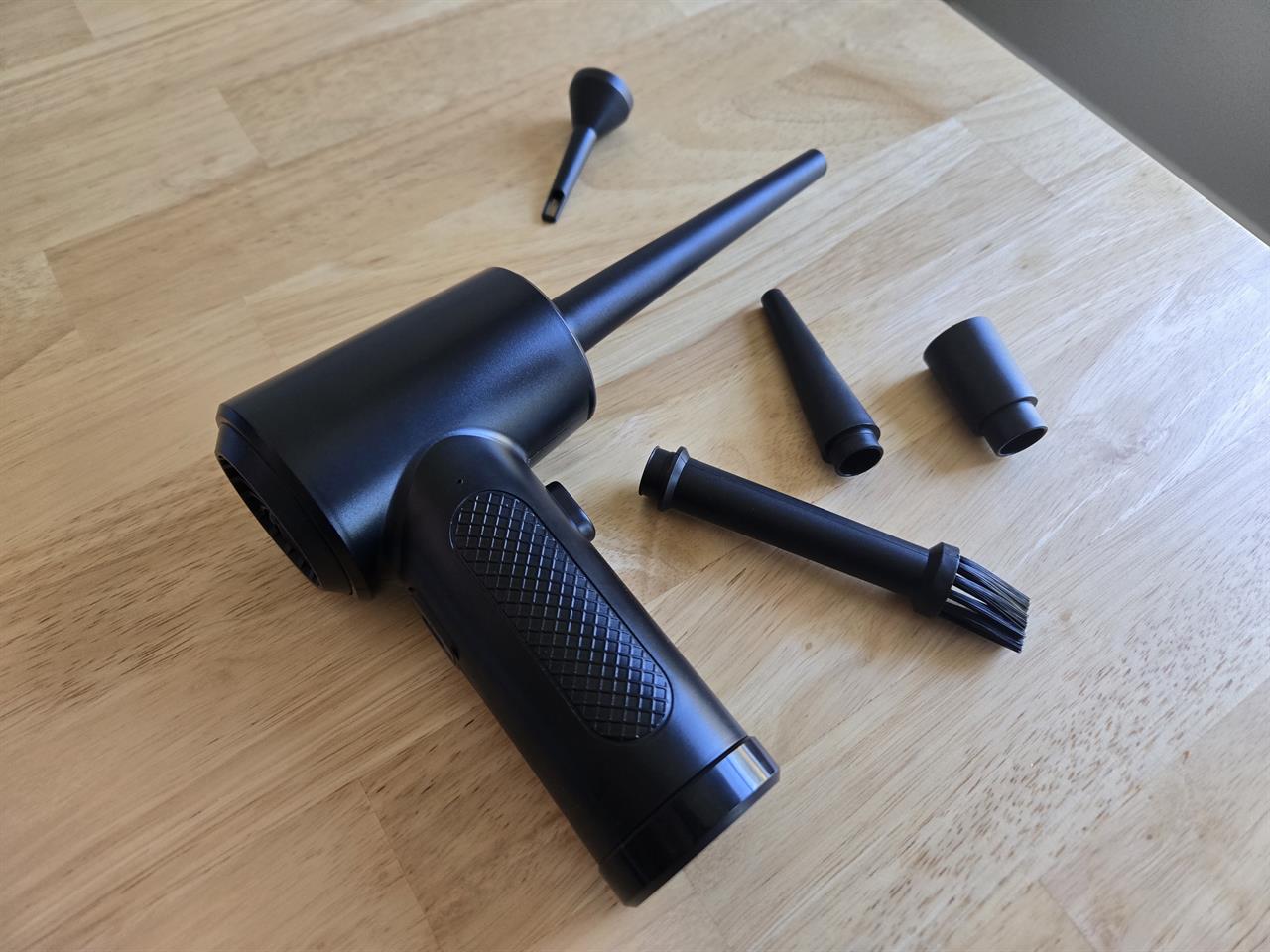
Photo: Chris Hoffman
The big question: Cordless or corded
I own this Fulljion compressed air duster. For $30 — that's the price of about six cans of compressed air — you get a reusable, cordless duster that charges over USB-C. Inland also makes a version of the same device with additional accessories.
This duster works well, but it doesn't blow as hard as a can of air does. That's actually not a bad thing: Compressed air often blows too fast, which is why so much advice tells people to watch out when blowing air at the fans inside their PCs. This cordless option does a fine job of getting the junk out of my mechanical keyboard and the dust off my PC's fans.
This model is rated for about 20 to 30 minutes of continuous use, which beats an air can that might give you five minutes or so of air at most.
If you do want faster speeds and no concern about battery life, consider buying a corded electric duster like this XPower model. It's still handheld, but you'll need to plug it into an electrical outlet. This model's reviews are full of people who are thrilled they swapped cans of air for it, so it should do the job if you're looking for intense bursts. Micro Center has a wide selection of air dusters of all sorts, too.
This duster is a home maintenance upgrade
With a reusable electronic duster, you may find yourself dusting out other things — you've probably never used canned air to get the dust out of the crevasses in your car.
You can walk around your house, blast out your air conditioner's dusty fan vents, get the visible dust off a window frame or baseboard, blast the dusty cables and surge protector under your task or home entertainment center, or finally get those crumbs dislodged from your toaster.
Now's the best time to upgrade
If you're on the fence, you should give it a try. Just be sure to get a corded model if you want maximum blowing speed and cordless portability isn't important to you.
Whenever I speak to someone who just bought an electric duster, they always wish they had made the investment sooner. Now's your chance.
More from MC News
- How to Start Benchmarking LLMs on your PC
- Explaining NVIDIA NVFP4, the DGX Spark's Secret Weapon
- Run AI Locally: The Best LLMs for 8GB, 16GB, 32GB Memory and Beyond
- Quantization Explained: Why the Same LLM Gives Better Results on High-End Hardware
- Why VRAM and Memory Bandwidth are Key for Powering Local AI
- Keyboard 101: Intro to Computer Keyboards
- Fix It Yourself: Talking to iFixit on Why Repairable Tech Matters
- Hands-on with NVIDIA DGX Spark: Everything You Need to Know
Chris Hoffman is a veteran tech journalist and the former Editor-in-Chief of How-To Geek. He's been going hands-on with PC hardware and getting his hands dirty with Windows for 15 years. And has written for publications including PCWorld, PCMag, Computerworld, The New York Times, Fast Company, and Reader's Digest.